The High-Performance Video Player for Android Mobile & Android TV
Engineered with an intelligent Triple-Engine architecture combining VLC, ExoPlayer, and Android MediaPlayer. Play any stream, any format, anywhere.
Designed for Both Living Room & Palm
Native dual-mode user experience: custom 10-foot Leanback interface for Android TV and fluid swipe-gesture navigation for Mobile.
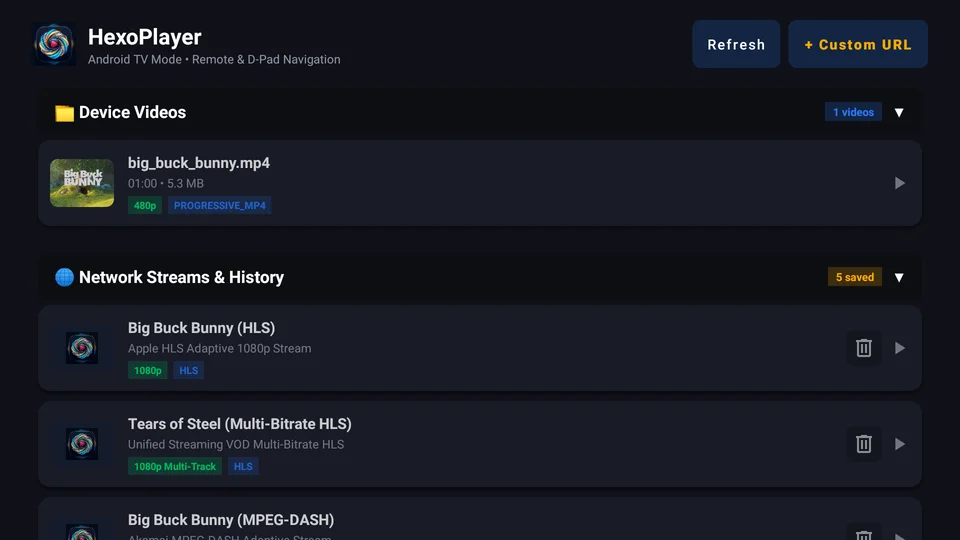
Android TV Experience
10-foot UI with full D-Pad remote navigation, expandable categories, high-contrast focus rings, and zero screen edge clipping.
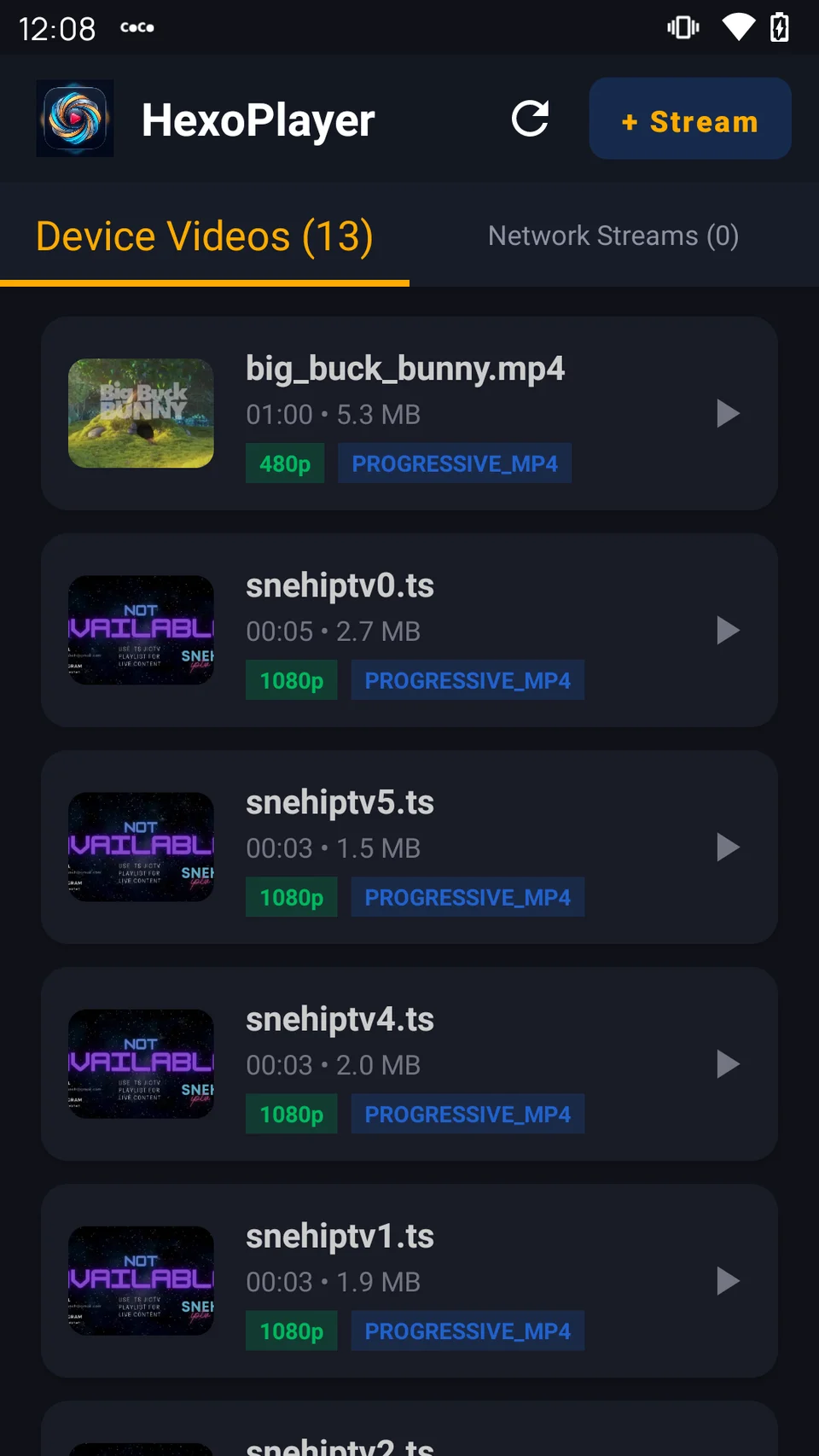
Android Mobile Experience
Dual-tabbed library with instant video frame thumbnail previews, hardware-assisted scrolling, and sleek dark mode palette.

Living Room Playback
Instant play/pause response, track selector, speed control, audio booster, and D-Pad transport controls.

Precision Mobile Gestures
Swipe left for brightness, swipe right for volume, double-tap to seek, and Picture-in-Picture (PiP) multitasking.
Engineered Without Compromise
Built from the ground up for maximum format compatibility, flawless playback stability, and zero stutter.
Triple-Engine Dynamic Fallback
Never experience an unplayable video. HexoPlayer automatically falls back across three high-performance playback engines:
Universal Format Support
Plays virtually every broadcast stream, container format, and video codec without requiring external plugins or transcoder servers.
Instant Video Frame Thumbnails
Local media items automatically generate real frame preview thumbnails from the video file itself, backed by an LRU cache for 60fps scrolling.
Custom HTTP Headers & History
Stream directly from protected IPTV links, CDNs, and custom servers with user-defined Referer, User-Agent, and Authorization headers.
Automatic In-App Updates
Always stay up to date. HexoPlayer checks for updates directly at launch, seamlessly assembling new releases with zero configuration.
Pure Dark Mode Aesthetic
Constructed with modern slate and midnight blue tones designed to reduce power draw on OLED mobile screens and look stunning on TV.
Use HexoPlayer as an External Player
Seamlessly integrate HexoPlayer into your Android application, IPTV app, OTT portal, or custom browser wrapper via standard Android Intents.
Intent Actions & Component Information
HexoPlayer can be launched either explicitly via component or implicitly via standard Android Intent filters.
Intent Extra Parameters Reference
| Parameter | Accepted Keys | Type | Requirement | Description & Values |
|---|---|---|---|---|
| Video Stream URL | intent.setData(Uri)url / video_url |
Uri / String | Mandatory | HTTP, HTTPS, RTSP, RTMP stream URL or local storage path (e.g. https://cdn.example.com/live.m3u8 or /sdcard/video.mp4). Supports HLS, DASH, MP4, MKV, TS, FLV, AVI. |
| Video Title | titlevideo_title |
String | Mandatory | The display name of the movie, TV show, or live channel shown in the top header and playback HUD (e.g. "Inception (2010) [4K]"). |
| HTTP Headers | headersheaders_json |
String (JSON) / Bundle | Optional | Custom headers dictionary passed as a JSON string (e.g. {"User-Agent": "CustomApp/1.0", "Referer": "https://cdn.example.com"}) or an Android Bundle. Enables protected IPTV streams, tokens, and cookies. |
| Subtitle Track | subtitlesubtitle_urlsubtitles_location |
String / Uri | Optional | Direct URL or local file path to an external subtitle file (supports .vtt, .srt, .ass, .ssa, .ttml). Automatically loaded and synced. |
| Start Position | positionplay_positionposition_ms |
Long / Int | Optional | Playback start timestamp in milliseconds (e.g. 45000 starts playback at 45 seconds). Allows resuming from previous sessions. |
| Skip Segment (Intro / Outro) | skip_start & skip_endor skip / skip_interval |
Long / Int (ms) String (JSON) |
Optional | Timestamps in milliseconds defining an intro, outro, or recap skippable range (e.g. skip_start = 10000, skip_end = 85000). When playback reaches skip_start, an on-screen "Skip ⏩" button automatically appears. If clicked (or DPAD Center pressed on TV), playback instantly jumps to skip_end. If ignored, the button automatically disappears past skip_end.Also supports JSON dictionary string (e.g. {"start": 10000, "end": 85000}) or comma-separated range ("10000,85000"). |
| Incognito Mode | incognitois_incognito |
Boolean | Optional | If set to true, this stream will not be recorded or displayed in the "Network Streams" history list on HexoPlayer's HomeScreen. Defaults to false. |
| Engine Override | engine |
String | Optional | Force initial playback engine: "VLC" (default hardware engine), "EXO" (Media3 ExoPlayer), or "SYSTEM" (Android MediaPlayer). Dynamic fallback occurs automatically if an engine fails. |
Return Values & Activity Result Callback
When the user dismisses HexoPlayer (presses Back, finishes playback, or if playback fails), HexoPlayer sends back the final playback position and status to the calling application via Activity.setResult().
| Result Key | Type | Result Code | Description & Values |
|---|---|---|---|
status |
String | RESULT_OK / RESULT_CANCELED |
Returns "OK" if playback ran or was watched, or "FAILED" if playback failed to open or play across all engines. The Android Activity result code is Activity.RESULT_OK (for "OK") or Activity.RESULT_CANCELED (for "FAILED"). |
positionposition_msplay_position |
Long | RESULT_OK / RESULT_CANCELED |
The player's playback position in milliseconds at the moment the player closed. Use this to sync resume progress with your backend or local database. |
duration |
Long | RESULT_OK / RESULT_CANCELED |
Total duration of the media file in milliseconds (or 0 if unparsed / live stream). |
error_message |
String | RESULT_CANCELED |
Detailed error message explaining the failure if status == "FAILED" (omitted on successful playback). |
url, title |
String | RESULT_OK / RESULT_CANCELED |
Echoes back the stream URL and Title of the media item that was being played. |
Integration Code Examples
// Launch HexoPlayer from Kotlin and receive playback progress & status callback
import android.content.ComponentName
import android.content.Intent
import android.net.Uri
import android.util.Log
import androidx.activity.result.contract.ActivityResultContracts
import androidx.appcompat.app.AppCompatActivity
import org.json.JSONObject

class MyActivity : AppCompatActivity() {

    // 1. Register ActivityResultLauncher to receive playback position & status
    private val hexoPlayerLauncher = registerForActivityResult(
        ActivityResultContracts.StartActivityForResult()
    ) { result ->
        val data = result.data
        val status = data?.getStringExtra("status") ?: "UNKNOWN" // "OK" or "FAILED"
        val positionMs = data?.getLongExtra("position", 0L) ?: 0L
        val durationMs = data?.getLongExtra("duration", 0L) ?: 0L
        val errorMsg = data?.getStringExtra("error_message")

        Log.i("PlayerCallback", "Closed with status=$status, position=$positionMs ms, duration=$durationMs ms")
        if (status == "FAILED") {
            Log.e("PlayerCallback", "Playback failed: $errorMsg")
        } else {
            // Save resume position into your app's watch history / database
            saveWatchProgress(positionMs)
        }
    }

    // 2. Launch HexoPlayer with video URL, skip intro, headers, and start position
    fun playVideo(
        videoUrl: String,
        title: String,
        resumePositionMs: Long = 0L,
        skipStartMs: Long = 0L,
        skipEndMs: Long = 0L,
        subtitleUrl: String? = null,
        headersMap: Map? = null,
        incognito: Boolean = false
    ) {
        val intent = Intent(Intent.ACTION_VIEW).apply {
            component = ComponentName("com.hexoplayer.video", "com.hexoplayer.video.ui.PlayerActivity")
            setDataAndType(Uri.parse(videoUrl), "video/*")

            // Mandatory metadata
            putExtra("title", title)

            // Start position in milliseconds
            putExtra("position", resumePositionMs)

            // Optional: Skip Intro / Outro button (pops up at skip_start, seeks to skip_end)
            if (skipEndMs > skipStartMs) {
                putExtra("skip_start", skipStartMs)
                putExtra("skip_end", skipEndMs)
            }

            // Optional: Incognito Mode (don't save to HexoPlayer's HomeScreen history)
            putExtra("incognito", incognito)

            // Optional: External Subtitle URL (.vtt, .srt, etc.)
            subtitleUrl?.let { putExtra("subtitle", it) }

            // Optional: Custom HTTP Headers dictionary (JSON formatted string)
            headersMap?.let {
                putExtra("headers", JSONObject(it).toString())
            }
        }

        try {
            hexoPlayerLauncher.launch(intent)
        } catch (e: Exception) {
            Log.e("PlayerLauncher", "HexoPlayer is not installed on this device", e)
        }
    }

    private fun saveWatchProgress(positionMs: Long) {
        // Your database logic
    }
}
// Launch HexoPlayer from Java and receive playback progress & status callback
import android.content.ComponentName;
import android.content.Context;
import android.content.Intent;
import android.net.Uri;
import android.util.Log;
import androidx.activity.result.ActivityResultLauncher;
import androidx.activity.result.contract.ActivityResultContracts;
import androidx.appcompat.app.AppCompatActivity;
import org.json.JSONObject;
import java.util.Map;
public class MyActivity extends AppCompatActivity {
private final ActivityResultLauncher hexoPlayerLauncher = registerForActivityResult(
new ActivityResultContracts.StartActivityForResult(),
result -> {
Intent data = result.getData();
if (data != null) {
String status = data.getStringExtra("status"); // "OK" or "FAILED"
long positionMs = data.getLongExtra("position", 0L);
long durationMs = data.getLongExtra("duration", 0L);
String errorMsg = data.getStringExtra("error_message");
Log.i("PlayerCallback", "Status: " + status + ", Position: " + positionMs + " ms");
if ("FAILED".equals(status)) {
Log.e("PlayerCallback", "Playback failed: " + errorMsg);
} else {
// Save playback progress to database
}
}
}
);
public void launchHexoPlayer(
String videoUrl,
String title,
long resumePositionMs,
long skipStartMs,
long skipEndMs,
String subtitleUrl,
Map headersMap,
boolean incognito
) {
Intent intent = new Intent(Intent.ACTION_VIEW);
intent.setComponent(new ComponentName("com.hexoplayer.video", "com.hexoplayer.video.ui.PlayerActivity"));
intent.setDataAndType(Uri.parse(videoUrl), "video/*");
intent.putExtra("title", title);
intent.putExtra("position", resumePositionMs);
intent.putExtra("incognito", incognito);
// Skip button parameters
if (skipEndMs > skipStartMs) {
intent.putExtra("skip_start", skipStartMs);
intent.putExtra("skip_end", skipEndMs);
}
if (subtitleUrl != null && !subtitleUrl.isEmpty()) {
intent.putExtra("subtitle", subtitleUrl);
}
if (headersMap != null && !headersMap.isEmpty()) {
JSONObject json = new JSONObject(headersMap);
intent.putExtra("headers", json.toString());
}
try {
hexoPlayerLauncher.launch(intent);
} catch (Exception e) {
Log.e("PlayerLauncher", "HexoPlayer not installed", e);
}
}
} # Launch playback using ADB with Skip Intro & Return Result:
# 1. Launch with Title, Resume Position, Skip Intro (10s to 85s), and Incognito mode:
adb shell am start \
-a android.intent.action.VIEW \
-d "https://commondatastorage.googleapis.com/gtv-videos-bucket/sample/BigBuckBunny.mp4" \
-t "video/*" \
-n com.hexoplayer.video/.ui.PlayerActivity \
-e "title" "Big Buck Bunny 4K" \
--el "position" 5000 \
--el "skip_start" 10000 \
--el "skip_end" 85000 \
--ez "incognito" true
# 2. Wait for player completion and inspect result in ADB terminal (-W flag):
adb shell am start -W \
-n com.hexoplayer.video/.ui.PlayerActivity \
-d "https://commondatastorage.googleapis.com/gtv-videos-bucket/sample/BigBuckBunny.mp4" \
-e "title" "Test Stream"
# 3. Stream with custom headers and subtitle:
adb shell am start \
-n com.hexoplayer.video/.ui.PlayerActivity \
-d "https://example.com/stream.m3u8" \
-e "title" "Live Sports HD" \
-e "subtitle" "https://example.com/subs/en.vtt" \
-e "headers" '{"Authorization":"Bearer TOKEN_XYZ","User-Agent":"MyClient/2.0"}'
// Flutter (using android_intent_plus):
import 'dart:convert';
import 'package:android_intent_plus/android_intent.dart';

void openInHexoPlayer() async {
  final intent = AndroidIntent(
    action: 'android.intent.action.VIEW',
    data: 'https://cdn.example.com/video.mp4',
    type: 'video/*',
    package: 'com.hexoplayer.video',
    componentName: 'com.hexoplayer.video.ui.PlayerActivity',
    arguments: {
      'title': 'Feature Movie (2026)',
      'position': 30000,      // resume from 30s
      'skip_start': 10000,    // popup "Skip" button at 10s
      'skip_end': 85000,      // jump to 85s
      'incognito': true,      // don't record in HomeScreen history
      'subtitle': 'https://cdn.example.com/sub.vtt',
      'headers': jsonEncode({
        'User-Agent': 'FlutterApp/1.0',
        'Authorization': 'Bearer YOUR_TOKEN',
      }),
    },
  );
  await intent.launch();
}